How to Withdraw from Arbitrum to Ethereum: The 7-Day Bridge, Fast Bridges, and What Actually Happens
The short version before the details
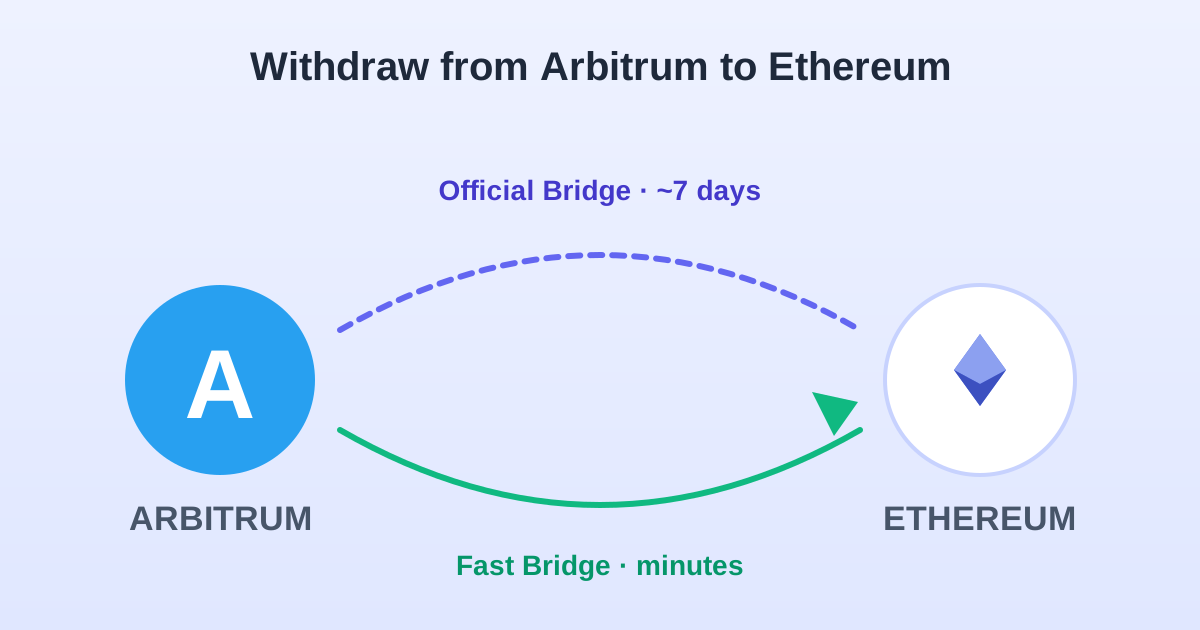
Withdrawing from Arbitrum to Ethereum mainnet is the reverse of depositing — and unlike the deposit (which lands in minutes), the official withdrawal takes about seven days. That is not a bug; it is the security mechanism of an optimistic rollup. You can skip the wait with a third-party fast bridge, which costs a small fee (typically 0.05-0.1%) but gets funds to L1 in minutes. This guide covers both routes with the actual costs and steps.
If you only need the conceptual explanation of why the delay exists, the withdrawal time explainer covers that. This article is the operational version: which bridge, which buttons, what it costs, and how to know it worked.
Why the official bridge takes 7 days
Arbitrum is an optimistic rollup. "Optimistic" means the system assumes every batch of transactions posted to Ethereum is valid, and gives anyone one week to prove otherwise by submitting a fraud proof. If nobody challenges the batch within that window, it is considered final. Your withdrawal is included in a batch, so it has to wait out the challenge window before it can be claimed on L1.
In practice, the delay is about 168 hours from the moment your L2 withdrawal transaction confirms. The clock starts when Arbitrum posts the batch containing your withdrawal to Ethereum, which can add a few hours. You do not need to keep your browser open, your wallet connected, or anything running — the process is entirely on-chain. When the window closes, you return to the bridge and claim.
This is the same design as Base and Optimism (all OP Stack / Arbitrum-style rollups have it), and it is the reason these chains are called "Layer 2" rather than "sidechains" — the security comes from Ethereum, and Ethereum requires that challenge window to guarantee it.
Route A: the official Arbitrum bridge (cheap, slow)
The official bridge lives at bridge.arbitrum.io. It is operated by Offchain Labs (the Arbitrum team) and is the cheapest route: you pay only the L2 transaction fee (about $0.01-0.05) to initiate, plus an L1 gas fee ($2-15 depending on mainnet conditions) when you claim after the 7-day window. No percentage fee, no spread.
The trade-off is the wait. For amounts where the wait does not matter — moving savings to cold storage, rebalancing after a trading period — the official bridge is the right choice. The seven-day wait is a feature, not a bug: it is the security guarantee that your withdrawal is protected by Ethereum's consensus. The full step-by-step is in the HowTo box above.
One thing to know: after the 7-day window, the withdrawal does not auto-arrive. You have to go back to the bridge and click "Claim" (sometimes called "Prove" then "Claim"), which triggers an L1 transaction. If you forget this step, the funds sit on the bridge contract indefinitely — they are safe, but not in your wallet. Set a calendar reminder for the claim date.
Route B: fast bridges (minutes, small fee)
Third-party bridges route around the 7-day wait by providing liquidity on L1 immediately and collecting your L2-side withdrawal when it finalizes. You get your ETH on mainnet within minutes; the bridge operator takes the 7-day wait and charges a fee for the convenience. The main options on Arbitrum in 2026:
| Bridge | Typical fee | Speed | Best for |
|---|---|---|---|
| Across | ~0.05-0.15% | 2-5 min | Consistent low fees, reliable routing |
| Hop | ~0.05-0.1% | 1-5 min | Good for ETH and stablecoin routes |
| Stargate | ~0.05-0.1% | 2-5 min | Multi-chain, good for complex routes |
| Official (bridge.arbitrum.io) | $0 fee (gas only) | ~7 days | Large amounts, no rush |
For a $500 withdrawal, a 0.1% fee is fifty cents — negligible compared to the convenience. For a $50,000 withdrawal, it is $50, and the official bridge starts looking attractive. My rule of thumb: under $5,000, use a fast bridge and don't think about it. Over $20,000, queue the official bridge and set a calendar reminder. In between, it depends on how urgently you need the funds on L1.
Withdrawing tokens, not just ETH
The official bridge handles ETH and a set of "gateway-bridged" tokens. For ERC-20 tokens that have a proper Arbitrum gateway (most major tokens — USDC, USDT, WBTC, ARB, etc.), the flow is the same: initiate on L2, wait 7 days, claim on L1. For tokens without a gateway (smaller or newer tokens), the official bridge may not support them, and you need a third-party bridge or a manual swap to ETH first.
Fast bridges typically support a wider range of tokens because they use liquidity pools rather than canonical gateways. Across and Stargate both handle most major ERC-20s on Arbitrum. If you are withdrawing an obscure token that no bridge supports, swap it to ETH or USDC on Arbitrum first (costs about a cent on a DEX), then bridge the ETH/USDC. The Uniswap fee guide shows the swap costs, and the approval guide covers the one-time allowance step.
What can go wrong, and how to check
Three things I see people hit:
- Forgot to claim after 7 days. The funds are safe on the bridge contract — check bridge.arbitrum.io, connect your wallet, and the claimable withdrawal will show up. Claim it.
- Insufficient L1 gas for the claim. The claim is an L1 transaction, so it needs ETH on mainnet (not Arbitrum). If your mainnet balance is zero, send a few dollars of ETH there first from an exchange or another wallet, then claim.
- Fast bridge delivers to the wrong chain. Most fast bridges let you pick the destination chain. If you accidentally selected Ethereum when you meant Base, the funds are on Ethereum — reconnect your wallet to Ethereum and they will show. Not lost, just inconvenient.
For confirmation at any stage, Arbiscan is the tool. The Basescan guide covers the Base explorer; Arbiscan is the same interface for Arbitrum. Search your address, check the "Token Txns" tab, and the withdrawal transaction is there with its hash and status.
Trade on Base / Arbitrum with Low Fees
Choose a trusted platform to swap, bridge, and trade on L2 networks.
Affiliate links — we may earn a commission at no extra cost to you.